

Jan. 16, 2026 updated
Applicable model
- KEW 6305
CAUTION
Both the Firmware and KEW Windows for KEW 6305 are required to upgrade to the updated version in order that your KEW 6305 works normally.
*Version can be checked here.
The latest version as of 16 January 2026
- Firmware: Ver 3.10 / 4.00 /5.00 (Jan. 16, 2026 updated)
*Available latest version varies depending on the firmware version of the product that you own. - KEW Windows for KEW 6305: Ver 1.60 (Dec. 14, 2022 updated)
Please click here to see the history of version upgrade.
Firmware
*Available latest version varies depending on the firmware version of the product that you own. Click here how to check the firmware version.
*If nothing appears during the firmware upgrade process, press the ESC switch.
For products with firmware V5.00:
| Operating System | Version | File |
|---|---|---|
| - | V5.00 | V5.0 is the latest firmware. |
For products with firmware V4.00:
| Operating System | Version | File |
|---|---|---|
| - | V4.00 | V4.0 is the latest firmware. |
For products with firmware V3.xx:
We ask you to register the serial number of your 6305 in order to install the software for the firmware.
* Serial number can be checked here.
How to install:
Please input the serial number of your 6305, and click "Next".
Note:Please use letters in capital.
*For the product with firmware V4.00 or later, please do not install the following firmware. It may cause malfunction.
|
Operating System |
Version | File |
|---|---|---|
| - | V3.10 |
KEW Windows for KEW 6305
CAUTION
- When updating the application which has been already installed in your PC, please uninstall the existing "KEW Windows for KEW 6305" via Add/Remove Programs on Control panel prior to updating the application.
How to install:
- Click the
 , it will be automatically download to the folder you chose.
 - Double-click the saved file. Installation starts after the file is unzipped. Follow the instruction displayed.
|
Operating System |
Version | File | Language |
|---|---|---|---|
| Windows 11 | V1.60 | |
[English] |
|
[French] | ||
|
[Netherlands] |
〈System Requirements〉
OS:Windows 11 Display:XGA(1024×768),65536 colors or more
Required HDD space:1Gbyte or later Others:USB port, .NET Framework(4.6.1 or later)
USB Device Driver
How to install:
- Click the and specify the folder to save. The file will be automatically download to the specified folder.
- Double-click the saved file. The file is unzipped and the installation starts. Follow the instructions displayed on the screen.
|
Operating System |
Version | File |
|---|---|---|
| Windows 11 | - | |
How to check the version of your KEW 6305
Firmware
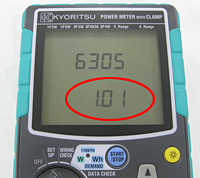
- KEW 6305 gets started when rotating and setting the Function switch to any position other than"OFF"Then, the start-up screen will be displayed.
- The part circled in red at the figure is the information for the version.
KEW Windows for KEW 6305
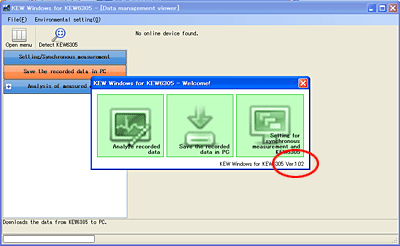
- Operate the KEW Windows for KEW 6305.
- The part circled in red at the figure is the information for the version.
How to check the serial number
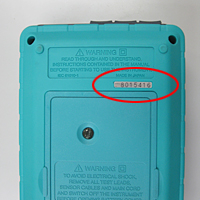
- Please see the rear of your KEW 6305 unit.
The number circled in red in the right picture is the serial number. - Please input this number.
Version history
Firmware
*Three different upgrade versions are available because multiple hardware configurations exist. Firmware version can be checked on your KEW 6305.
For products with firmware V5.00:
| Version | Date | Remark |
|---|---|---|
| 5.00 | Dec.2025 |
|
For products with firmware V4.00:
| Version | Date | Remark |
|---|---|---|
| 4.00 | Aug.2025 |
|
For products with firmware V3.xx:
| Version | Date | Remark |
|---|---|---|
| 3.10 | Aug.2025 |
|
| 3.00 | Apr.2024 |
|
|
2.10 |
Mar.2023 |
|
|
2.01 |
Jul.2022 |
|
|
2.00 |
Sep.2021 |
|
| 1.11 | Feb.2019 |
|
| 1.10 | Feb.2018 |
|
| 1.09 | Sep.2015 |
|
| 1.08 | Oct.2014 |
|
| 1.07 | Apr.2014 |
The following problems are solved:
|
| 1.06 | Mar.2014 |
|
| 1.05 | Sep.2013 |
The following problems are solved:
|
| 1.04 | Jul.2013 |
|
| 1.03 | Jan.2013 |
|
| 1.02 | Oct.2012 |
|
| 1.01 | May.2012 |
|
| 1.00 | Apr.2012 |
|
KEW Windows for KEW 6305
| Version | Date | Remark |
|---|---|---|
| 1.60 | Dec.2022 |
|
| 1.51 | Sep.2021 |
|
| 1.50 | Nov.2019 |
|
| 1.42 | Oct.2018 |
|
| 1.41 | Mar.2018 |
|
| 1.40 | Feb.2018 |
|
| 1.30 | Nov.2016 |
|
| 1.20 | Nov.2016 |
|
| 1.10 | Apr.2016 |
|
| 1.06 | Feb.2016 |
|
| 1.05 | Aug.2014 |
|
| 1.04 | Dec.2013 |
|
| 1.03 | Sep.2012 |
|
| 1.02 | Jul.2012 |
|
| 1.01 | Mar.2012 |
|
| 1.00 | Apr.2012 |
|